 Hidden
Hidden
Hidden
Hidden
Hidden
Hidden
Hidden
USING INSTRUNET WITHIN DASYLAB Below are several notes on DASYLab ≥ v7.0 operation with instruNet using version ≥ v11.0.0.152 of the DASYLab/instruNet interface (i.e. "..Program Files \ DASYLab \ iNet.dll"). Block Size instruNet Icons Low and High Speed Digitize Modes
Synchronizing Channels with Different Sample Rates and Block Sizes Output Block Delay Analog and Digital Output Digital Input and Digital Output Icons
instruNet has its own Timebase Input/Output Feedback Loop
Example Worksheets Troubleshooting
|
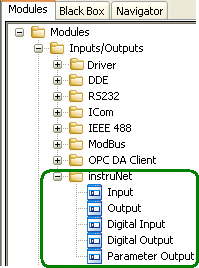 In the newer versions of DasyLab, one accesses instruNet icons under "Modules Input/Output", as shown to the right.
In older versions of DasyLab, these icons were accessed from the menubar, under "instruNet".
In the newer versions of DasyLab, one accesses instruNet icons under "Modules Input/Output", as shown to the right.
In older versions of DasyLab, these icons were accessed from the menubar, under "instruNet".
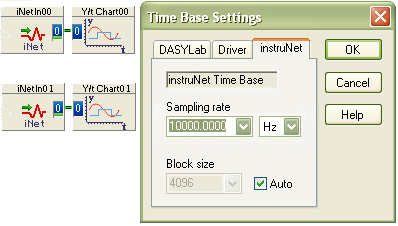 The newer versions of DASYLab have a timebase area for instruNet, as shown in the photo to the right. This is where one sets the sample rate,
in units of samples-per-second-per-channel, and also the block size. Setting block to Automatic often works well. The above picture shows digitizing
from an analog input channel and a digital i/o group channel (e.g. i4xx Ch29 Uio25_28, i100 Ch25 DioGroup) at 10ks/sec/ch .
The newer versions of DASYLab have a timebase area for instruNet, as shown in the photo to the right. This is where one sets the sample rate,
in units of samples-per-second-per-channel, and also the block size. Setting block to Automatic often works well. The above picture shows digitizing
from an analog input channel and a digital i/o group channel (e.g. i4xx Ch29 Uio25_28, i100 Ch25 DioGroup) at 10ks/sec/ch .